New Apple iOS 14 updates are changing the game for iPhone tracking and remarketing – and not in a good way. The biggest change is the way users can opt out of ad tracking. Because users can choose not to allow these ad tracking features, Facebook’s reporting and retargeting options will be majorly affected.
Read more about the Apple iPhone tracking updates and how it affects Facebook ads moving forward.
What Are The Apple iPhone Tracking Updates and Remarketing Changes?
If you are experienced with remarketing Facebook ads, you have likely noticed some of the adjustments are already impacting your campaigns.
Facebook ads on Apple devices now have delayed reporting for up to three days. There is also less breakdown support for age, gender, and platform.
Because iPhone Facebook ads aren’t available for remarketing unless the user opts in, you’ll be dealing with smaller retargeting audiences.
The updates change how conversion events have to be handled. Now, Apple requires all apps in the App Store to show a tracking prompt to iOS users.
In addition, Apple’s new updates will prohibit data sharing and collection if the user hasn’t opted into the tracking prompt.
Unfortunately, many users are likely to turn down ad tracking. Marketers and business owners will take a huge hit since the United States has 116 million iPhone users as of 2021.
Apple released the iOS 14.5 update on April 26, 2021. The original iOS 14 release was in September 2020. Together, these two updates are making it harder for advertisers to generate revenue from ads.
In the iOS 14 Facebook update, Apple required apps to get permission to collect data using the Apple device identifier.
Normally, advertisers can use a unique device number known as an IDFA to target ads and collect data about an ad’s performance.
With iOS 14, Facebook is required to stop collecting IDFA information without the user’s permission.
About 49% of American phone users have iPhones, so it would be difficult to underestimate the impact this change has had on ad performance.
In order to navigate these changes, knowing how to create remarketing ads on Facebook is extremely important.
With a few simple steps, you can adjust to the new environment and start remarketing Facebook ads.
How You Can Navigate iPhone Tracking and Remarketing With iOS 14 and 14.5
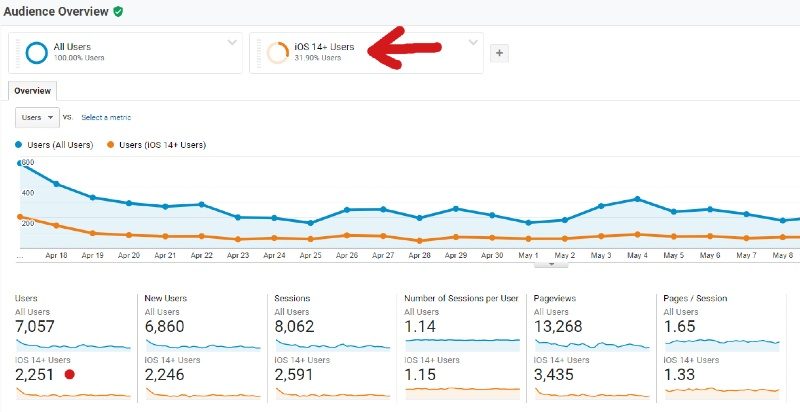
Knowing how to create remarketing ads on Facebook takes practice and patience. By learning how to target your audience more effectively, you can reduce the impact the iOS 14 update will have on your Apple Facebook ads.
Review Your Data
The update for iPhone Facebook ads is going to negatively impact your data.
You won’t be able to retarget a large segment of your clients now that they have more control over their ads. This makes the information you do have even more important.
Instead of simply looking at your results, you need to see how your ads get engaged and why. Currently, Facebook will only let you track eight conversion events in your events manager, so it is important to pick your conversion events wisely.
Go Back to the Drawing Board
For the last decade, marketers have been spoiled by how easy technology made retargeting campaigns, A/B testing, and conversions.
With the new update to Apple Facebook ads, it is time to go back to the drawing board and use old-school techniques.
You can’t merely show the same ad over and over again to a targeted iPhone user. Now, you’ll need to run some surveys and polls to identify your customer’s opinions.
You will also need to test out different ads and targeting methods to see which ones work the best.
Additionally, you might want to try using a post-purchase survey as well. In the survey, ask customers where they originally heard about your company.
If you notice everyone is coming from a common location, you should devote your resources to it.
Test Out Marketing Automation
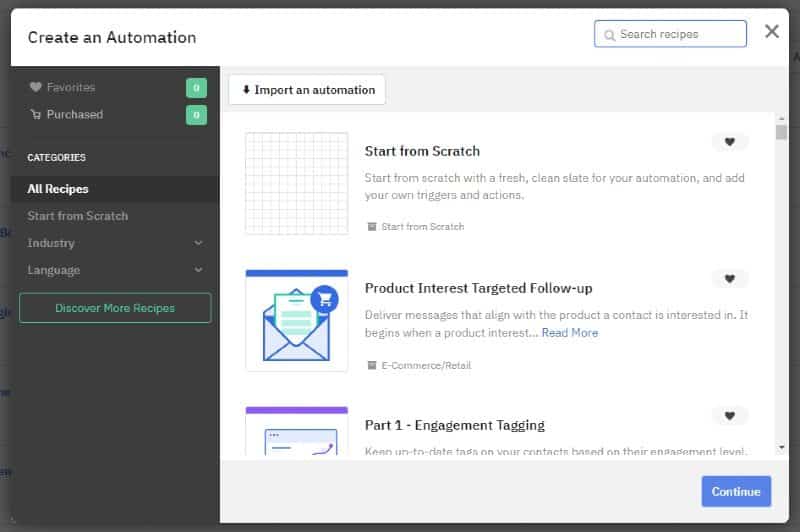
If you don’t have time to figure out all of the changes, you may want to test out marketing automation solutions with options like HubSpot, Klaviyo, ActiveCampaign, and others.
These tools can help you learn more about your customers and boost engagement across multiple platforms.
Reach Out to Professionals
While the iOS 14 Facebook update has changed things up, you won’t have to deal with these changes alone. Every other marketer and business owner is having to navigate the same changes.
Your competitors will be equally impacted by the recent iOS updates.
As marketers adjust to the new situation, you can get information through online forums, industry conferences, and professional groups.
You can learn from other professionals what techniques are working and which ones aren’t. Along the way, you can save yourself a lot of time and money by letting other people test out new workarounds for you.
Verify Your Website’s Domain
If you plan on using conversion ads and retargeting, you will need to verify your website’s domain. This is done for any top-level domain plus one (ETLD+1). If your domain is also registered in the Public Suffix List, you may also be able to verify it.
Redesign Your Campaigns
You don’t have to make a new ad account to market ads to iOS 14 users, but you do need to create a different iOS 14 app install campaign.
This is because Apple’s SKAdNetwork API limits you from using the same ads with iOS 14 Facebook users.
When remarketing Facebook ads, you can use the same ad account to advertise multiple apps, but your app can only be linked to one ad account. In total, Apple limits you to just nine iOS 14 campaigns at a time, and each campaign can only have five ad sets.
While you can buy ads with Auction, Reach and Frequency aren’t available for iPhone Facebook ads.
The Silver Lining
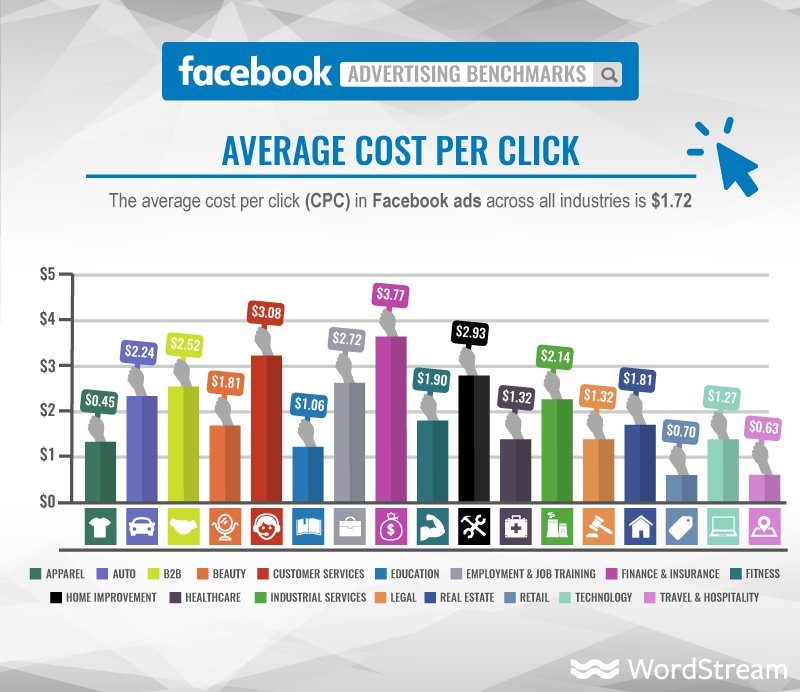
Facebook ads average cost per click (CPC) by industry in 2020 by Wordstream
As long as there is demand for Facebook ads, the price you pay most likely won’t change. However, the new policy will eventually impact how much marketers are willing to pay for Facebook ads.
Tracking prevention will make ads less relevant, which means users are less likely to click on them.
Over time, this will eventually impact how much businesses will pay for these ads and Facebook’s bottom line. Sooner or later, the price will adjust itself, and you’ll get a break for having less effective ads.
Dealing with iOS 14 and 14.5 Changes to iOS Remarketing
Knowing how to create remarketing ads on Facebook is a learned skill, especially with the recent iOS 14 Facebook update.
While ad tracking and remarketing are a little more difficult now, you can successfully achieve your conversion goals with a little work.